
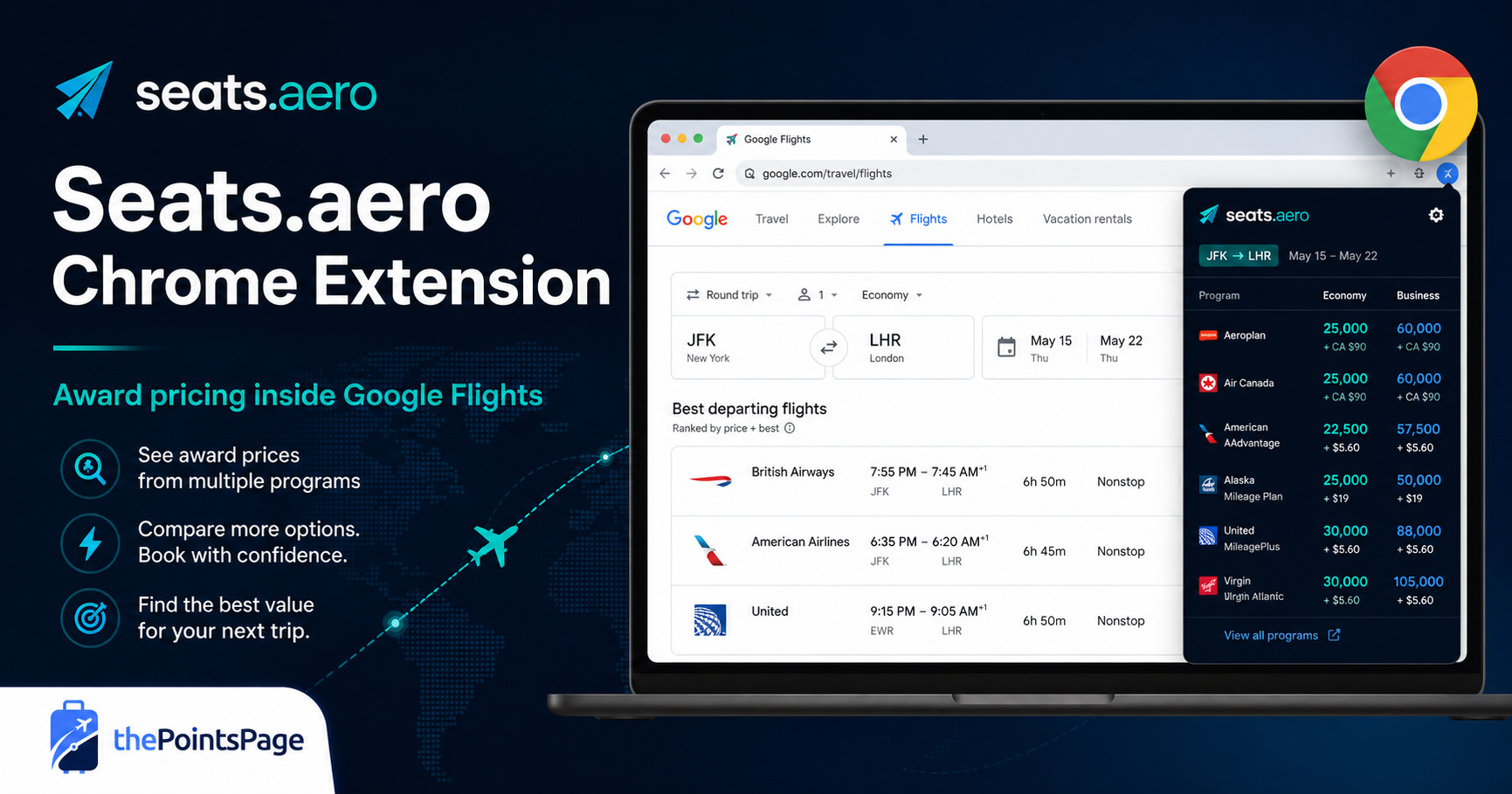
Quick Take: Seats.aero has launched a new Chrome extension that displays award flight pricing directly alongside cash fares in Google Flights. Travelers can see potential redemption options from more than 25 airline loyalty programs, compare different ways to book the same flight, and filter results based on the points programs they actually use.
Award flight searches and Google Flights searches have traditionally lived in two different worlds.
You might use Google Flights to compare schedules, connections, airlines, and cash prices. Then you would open a separate award search tool—or several airline websites—to figure out whether the same flights could be booked with points.
Seats.aero is now trying to combine those steps with a new Chrome browser extension that inserts award pricing directly into your Google Flights search results.
It does not eliminate every complication involved in booking award travel, but it could make one of the most time-consuming parts of the process significantly easier.
What the Seats.aero Extension Does
After installing the extension, you can search Google Flights the same way you normally would. Seats.aero then begins adding available points prices underneath the cash fares shown in your results.
When award availability exists, you may see the lowest available points price for that flight. Hovering over the award price can reveal additional information, including:
- The airline loyalty programs that can book the flight
- Alternative points prices
- Estimated taxes and fees
- The cabin associated with each award
- When the award result was found
Clicking an award result opens additional details through Seats.aero, where you can review the available booking programs and continue toward the airline or loyalty program website.
This is particularly useful when the same flight can be booked through several different programs. A United flight, for example, might be available through United MileagePlus, Air Canada Aeroplan, Turkish Miles&Smiles, or another Star Alliance program—with very different prices and fees.
Why This Could Be So Useful
Google Flights is already one of the best tools for comparing flight schedules. It makes it easy to evaluate departure times, connection lengths, aircraft, operating airlines, and cash prices.
The problem is that the cheapest cash itinerary is not necessarily the best itinerary to book with points.
A $600 ticket might require an unreasonable 90,000 miles through one program but only 30,000 points through a partner. A more expensive cash flight might also have significantly better saver-level award availability.
By adding award information to the same search results, the extension makes it easier to spot those differences without repeatedly switching between websites.
It should be especially helpful for domestic awards, positioning flights, and itineraries where multiple airline partners can access the same seat.
Filter Results Based on Your Points
One of the extension’s strongest features is the ability to filter the award results that appear.
Instead of showing every possible program, you can narrow the results based on factors such as:
- Transferable points programs: Select the bank points you currently have access to.
- Airline programs: Include or exclude specific frequent-flyer programs.
- Maximum award price: Hide options that require more points than you are willing to spend.
- Maximum taxes and fees: Pro users can filter out awards with unusually high cash surcharges.
That means someone with Chase Ultimate Rewards points could focus on programs accessible through Chase, while someone with American Express Membership Rewards could configure the extension around Amex transfer partners.
Free Access Versus Seats.aero Pro
The extension can be installed and used without paying for Seats.aero Pro, but the free version has several important limitations.
| Feature | Free | Pro |
|---|---|---|
| Search window | Up to 60 days | Beyond 60 days |
| Award data | Primarily cached results | Live searches when supported |
| Direct flights | Included | Included |
| Connecting itineraries | Limited | Additional connecting-flight results |
| Advanced filters | Limited | Additional filtering options |
Free access should still be useful for travelers booking relatively close to departure, particularly when searching for nonstop flights.
Travelers planning farther in advance, searching complicated international itineraries, or looking for premium-cabin awards will receive considerably more functionality from a Pro account.
How to Install and Use It
- Install the official extension. Visit the Chrome Web Store and add the Seats.aero extension to your browser.
- Pin the extension. Pinning it to the Chrome toolbar makes it easier to see its search progress and access your settings.
- Open Google Flights. Enter your origin, destination, dates, and passenger information normally.
- Wait for award results. Initial results may appear within a few seconds, with additional options continuing to populate.
- Hover over a points price. Review the available airline programs, points requirements, and fees.
- Click through for details. Use Seats.aero to review the booking options and then confirm the award directly with the loyalty program.
The extension officially supports Google Chrome and other Chromium-based browsers capable of using Chrome extensions, including Microsoft Edge and Brave. Firefox and Safari are not currently supported.
Always Confirm Before Transferring Points
The most important limitation is the same one that applies to nearly every third-party award search tool: the result you see is not a guaranteed bookable seat.
Award availability can disappear quickly. Dynamic award prices can change, cached results can become outdated, and some partner programs occasionally display availability that cannot actually be booked.
Never transfer flexible credit card points based only on what appears in the extension.
Open the airline or loyalty program website, reproduce the search, verify the points price and fees, and make sure the seats can be selected before initiating a transfer. Most transfers cannot be reversed once completed.
Who Will Get the Most Value From It?
The extension should be useful for several different types of travelers.
- Beginners can see that a flight may have several points-booking options without learning every airline alliance first.
- Intermediate users can compare cash prices and award prices without maintaining several separate browser tabs.
- Advanced travelers can quickly uncover partner-program sweet spots and filter out programs they cannot access.
- Families can use Google Flights to identify workable schedules before investigating whether enough award seats exist.
- Premium-cabin travelers can more easily identify flights worth researching further through Seats.aero’s full search tools.
It may also help demonstrate why transferable points are so valuable. Instead of seeing only one airline’s mileage price, users can see several programs competing to book the same seat.
Ready to Compare Award Flights Faster?
Use Seats.aero to search award availability across multiple airline loyalty programs, or install the Chrome extension to see potential points prices while browsing Google Flights. Just remember to confirm availability directly with the airline before transferring any points.
ThePointsPage may earn a commission when you use our Seats.aero link, at no additional cost to you.
Getting to the Point(s)
Seats.aero’s new Chrome extension will not completely automate the award-booking process, and it will not replace the need to verify availability directly with an airline.
What it does accomplish is still important: it brings cash fares, flight schedules, and potential award options into the same search workflow.
For beginners, that could make award travel feel considerably less intimidating. For experienced points and miles users, it could save time and surface booking options that might otherwise be overlooked.
The extension is free to install, so it is worth testing during your next Google Flights search—even if you are not currently paying for Seats.aero Pro.